Originally published 2019, updated 2026.
Print shop production scheduling is deciding which ready jobs run on which presses or machines on which day, so every order finishes before its customer due date without overloading the shop. A schedule that works starts from capacity, not from due dates: how many hours your constrained equipment can really run, and how long each job really takes. It separates the date the customer needs the order from the date production must finish, and schedules jobs only after art is approved and goods are received. Customers will always order late. A schedule with honest capacity and built-in buffers absorbs that.
This guide covers production versus customer due dates, a simple capacity calculation, readiness rules, sequencing around bottlenecks, and a daily review. Printavo is built for apparel decorators: screen printers, embroiderers, and DTG and DTF shops.
What is the difference between a customer due date and a production due date?
The customer due date is when the order must be in the customer’s hands. The production due date is when the shop must finish it to meet that date, after shipping time and a buffer.
Production due date = customer due date − shipping days − buffer days
Example: an order must arrive Friday, November 20. Ground shipping takes 2 business days, and the shop keeps a 1-day buffer, so production is due Tuesday, November 17. Schedule against Tuesday, promise Friday.
How do you calculate print shop capacity?
Estimate capacity for your constrained equipment from observed rates, not maximum speeds.
Job hours = setup hours + (pieces × print locations) ÷ impressions per hour
Illustrative example: 300 shirts with 2 print locations on an automatic press averaging 400 impressions per hour is 600 impressions, or 1.5 hours, plus two 30-minute setups, for 2.5 hours. If the press has 6 productive hours a day, that job takes 42% of the day. Measure your own rates for a few weeks before relying on them.
When is a job ready to schedule?
Schedule only jobs that pass the readiness gate: quote approved, artwork approved, deposit received if required, garments received and counted, screens or files ready. A job waiting on any of these goes on a watch list with a date, not on the press calendar. Scheduling half-ready jobs is the most common reason a printed schedule falls apart by 10 a.m.
How should you sequence jobs?
- Fill the constrained equipment first; schedule everything else around it.
- Group jobs with similar ink colors, garments, or setups to cut changeovers.
- Split large orders across days so one job does not block every rush.
- Leave 10% to 20% of capacity open for reprints and rushes [general practice; adjust to your rush history].
- Put rush jobs in only with a rush fee and a clear decision about what moves.
How do you keep the schedule accurate every day?
Run a 10-minute review each morning that looks only at exceptions: jobs late to their production due date, jobs blocked by missing art or goods, and anything over capacity. Make one decision per exception. Once a week, compare planned versus actual job hours and adjust your rates.
A real shop workflow: from due-date stacking to capacity planning
A shop with one automatic and two manual presses schedules by customer due date, so Thursdays overflow and Mondays run half-empty. The production manager starts setting production due dates 2 days earlier, measures actual job hours for a month, and caps the automatic at 6 scheduled hours per day. Jobs without received goods stay off the calendar. Thursday overtime drops, and rushes fit into the reserved capacity instead of bumping confirmed jobs.
How Printavo handles production scheduling
Printavo is production-first shop management software for apparel decorators, connecting quoting, approvals, scheduling, invoicing, and payments. Note: Features below vary by plan tier.
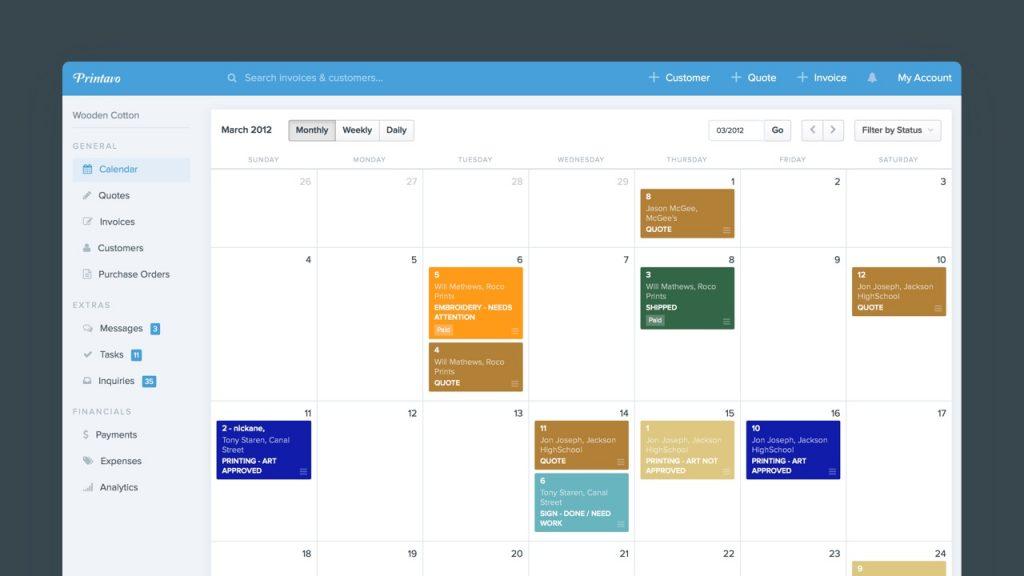
- Calendar shows jobs by color-coded status across art, approval, and production, with drag-and-drop rescheduling between days or departments.
- Power Scheduler breaks each job into tasks by decoration method, assigns them to machines, shows green, yellow, and red capacity indicators, and supports job grouping, job splitting, and drag-and-drop rescheduling. Order statuses update as tasks complete.
- Statuses and automations keep customers informed as jobs move.
Video: production scheduling
FAQ
What is the best way to schedule screen printing jobs? Schedule ready jobs against production due dates, fill your constrained press first, and group similar setups.
How much buffer should a print shop keep? Enough to cover your normal reprints and rushes. Many shops start with one buffer day per order and 10% to 20% open capacity, then adjust.
How do I handle rush orders? Charge for them, check capacity before accepting, and decide in advance which job moves if one must.
Do I need scheduling software? Not for one press. With several machines, methods or more than a few dozen open orders, a shared calendar with capacity in view saves time.
Related guides
- Print production management
- Print shop job tracking
- Buying an automatic screen printing press
- Printavo pricing
Plan production around real capacity. Try Printavo free for 7 days. No credit card required.