Originally published 2020, updated 2026.
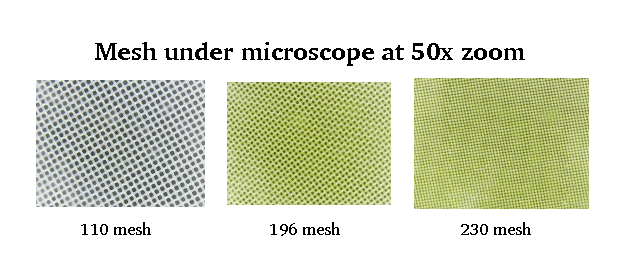
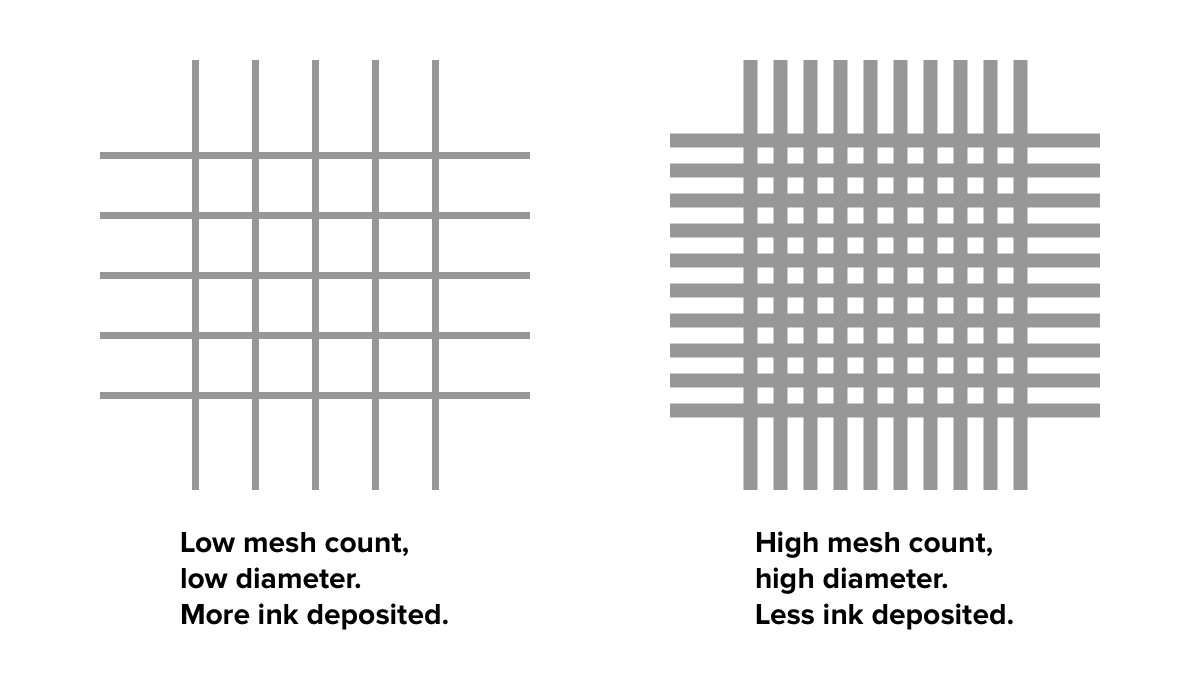
Screen printing mesh count is the number of threads per inch in a screen’s mesh. A lower mesh count has larger openings and lays down a heavier ink deposit. A higher mesh count has smaller openings, holds finer detail, and lays down a thinner deposit. Most garment shops keep a few counts on hand: around 110 for heavy plastisol, white underbases, and specialty inks; around 156 to 160 for everyday spot color; and 200 to 230 for detail, halftones, and water-based ink. Fine halftones and simulated process often go to 280 or 305.
Those numbers are starting points. The right mesh for a job depends on the artwork, the ink, the garment, the thread diameter, and the screen tension, so the most reliable answer comes from your testing and keeping notes of what worked.
Mesh count chart: which mesh for which job?
| Mesh count (threads per inch) | Typical use | Ink deposit |
|---|---|---|
| 25 to 60 | Glitter, shimmer, and other large-particle specialty inks | Very heavy |
| 83 to 110 | White underbase and heavy plastisol on dark garments, puff, bold block text | Heavy |
| 125 to 160 | General spot color on light and dark garments | Medium |
| 180 to 230 | Fine lines, halftones, water-based and discharge inks, colors printed over an underbase | Light |
| 260 to 305 | Fine halftones, simulated process and four-color process | Thinnest |
Mesh made in metric countries is labeled in threads per centimeter. Multiply by 2.54 to get threads per inch: 43 per cm is about 110 per inch, 77 per cm is about 196, and 120 per cm is about 305.
What mesh count should you use for plastisol on dark shirts?
For a white underbase or a single heavy white on a dark shirt, most shops start at 110 and go up to 156. A 110 puts down more ink for opacity. A 156 keeps edges sharper and the print softer, and may need a second stroke or a flash. Colors printed on top of the underbase usually go on a higher count, often 200 to 230, so they lay thin and do not build up. See how to screen print with white ink for more on opacity.
What mesh count should you use for water-based and discharge inks?
Water-based and discharge inks are usually printed through higher counts, commonly 160 to 230, because the ink is thinner and soaks into the fabric rather than sitting on top. A finer mesh also helps reduce drying in the screen. Read screen printing with water-based inks and the screen printing ink guide for handling and curing.
How do you pick mesh for halftones?
A common rule of thumb is to use a mesh count at least 4 times the halftone line count (lines per inch, or LPI). This leaves enough threads to hold each dot, reducing the risk of moiré.
Minimum mesh count ≈ 4 × halftone LPI
At 45 LPI, start at 180 mesh or higher. At 55 LPI, start at 220 or higher. At 65 LPI, start around 260. Test, because ink, emulsion, and press setup change how dots hold.
What else changes how a screen prints?
Mesh count alone does not describe a screen. Two screens with the same count can print differently.
- Thread diameter. Thicker thread at the same count means less open area and a thinner deposit.
- Tension. Low or uneven tension causes blurry edges and registration drift. Measure with a tension meter, follow the mesh maker’s range, and record the reading and date on the frame.
- Mesh color. Dyed (often yellow) mesh reduces light scatter during exposure, which helps fine detail. White mesh is common for general work.
- Emulsion and exposure. Stencil thickness and exposure time change deposit and edge quality. Run an exposure test for each emulsion-mesh combination to set exposure times.
- Press setup. Squeegee durometer, angle, pressure, speed, and off-contact all affect the result.
If a print fails, check the entire system before randomly swapping the mesh. Change one variable at a time and write down what changed.
How do you test and record mesh choices?
- Pick a representative design, garment, and ink for a job type you print often.
- Burn the design on two or three mesh counts with the same emulsion and exposure.
- Print each with the same press settings and cure.
- Compare detail, opacity, hand feel, and wash results.
- Record the winning mesh, tension, emulsion, exposure, squeegee, and flash settings.
- Use that record as the starting point for the next similar job, and retest when ink, mesh, or equipment changes.
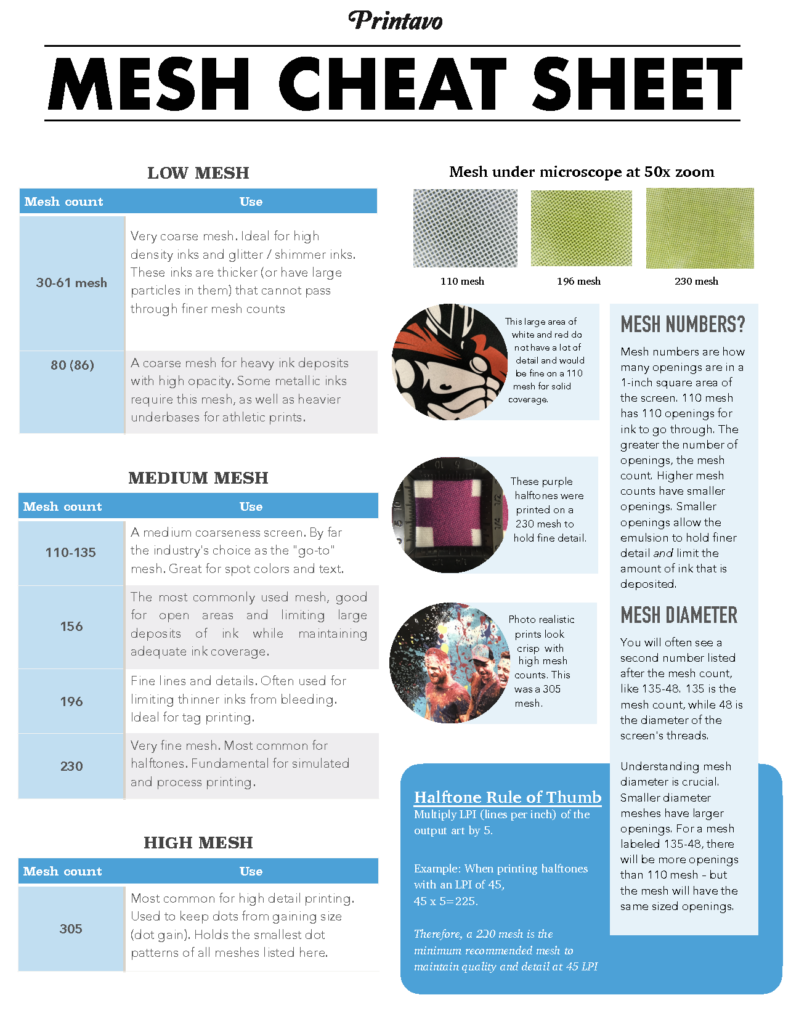
Grab a copy of the Printavo Mesh Cheat Sheet here for a quick reference. As a reminder, your tested records are the real standard.
A real shop example: three colors on black tees
A shop quotes 144 black tees with a three-color front: white, red, and yellow. The art has a fine line border and a small halftone fade.
- White underbase on a 156 for opacity with sharp edges.
- Red and yellow on 230 so they lay thin over the base and hold the halftone at 45 LPI.
- Highlight white on a 180 to brighten the white areas without building up ink.
- The operator records each screen’s mesh and tension on the job, so the reorder in spring starts from the same setup.
Build a screen library your whole team can use
Label every frame with the mesh count, thread size (if known), and the last tension reading. Store screens by count so the screen room can pull them quickly. Most important, keep the mesh and settings with the order, not in one person’s memory.
Shops that run on Printavo can add production notes to each order and use tasks for screen room steps such as “screens burned” and “screens tensioned,” so the next reorder starts with the setup that worked. On Premium, production files attach directly to the job for the press operator.
FAQ
What is the most common mesh count for screen printing t-shirts? A 156 or 160 is the most common all-purpose count for plastisol spot color on garments. Many shops also keep 110 and 230 screens for heavy and fine work.
Does a higher mesh count mean better print quality? No. A higher count holds finer detail but deposits less ink. A heavy white on a dark shirt can look worse on a 305 than on a 110.
What mesh count should I use for glitter ink? Large particles need large openings. Shops commonly use counts from 25 to 60; follow the ink maker’s guidance.
How do I convert mesh count from centimeters to inches? Multiply threads per centimeter by 2.54. For example, 90 per cm is about 230 per inch.
Related guides
- Printavo print shop software
- The screen printing process, step by step
- DTG vs. screen printing: pros, cons and costs
- CTS and DTS for screen printing
- Screen printing pricing guide (price screens and setups into every quote)
Printavo is production-first shop management software for apparel decorators that connects quoting, approvals, scheduling, invoicing, and payments. Try Printavo free for 7 days. No credit card required.