Originally published 2022. Updated 2026.
Embroidery shop management software: what it does and how to choose one
Embroidery shop management software is the system an embroidery business uses to run each order from quote to payment: customer records, stitch-based pricing, sewout and artwork approvals, production scheduling, invoices, and payment collection.
This software is different from digitizing software, which turns artwork into a stitch file the embroidery machine can read. Unless embroidery is being outsourced, most shops need both programs. The digitizing program determines how the design is sewn. The shop management system determines how an order moves through the shop and is paid for.
This guide explains the difference, what an embroidery order needs to include, how to price and schedule machine time, and what to ask when comparing systems. Printavo is built for apparel decorators: screen printers, embroiderers, and DTG and DTF shops.
What are key functions of digitizing software and shop management software?
Digitizing software handles more of the design work, while embroidery shop management software covers operations. Here’s how both software types work:
| Digitizing and design software | Embroidery shop management software | |
|---|---|---|
| Job it does | Converts artwork into a stitch file (DST, PES, EXP, and other machine formats) | Runs the order from quote to payment |
| Main users | Shops with in-house embroidery services | Owner, sales, production manager, bookkeeper |
| What it produces | Stitch file (often .DST format), stitch count, color sequence, sewout | Quote, approval record, schedule, invoice, payments |
| Examples | Wilcom, Tajima, Brother | Printavo and other apparel shop platforms |
| What breaks without the other | Nobody knows which file version the customer approved | Orders are organized, but the file sews poorly |
List your current bottleneck before you compare products. For example, thread breaks and puckering are digitizing issues, while missed deadlines and late payments are operations issues.
What information should every embroidery order carry?
An embroidery order should include everything the machine operator needs in a single order:
- Garment style, color, and size breakdown
- Product type: whether each piece is a cap or a flat.
- Placement and finished size for every location (for example, left chest, 3.5 inches wide).
- The approved file version with stitch count and thread color sequence.
- Backing or stabilizer, hoop or frame size, and any topping.
- The sewout photo or proof the customer approved, with the approval date.
- Finishing: trimming, pressing, folding, bagging, and labeling.
- Due date, ship or pickup method
- Payment and deposit status.
If this information is consolidated into an order in a shop management system rather than a folder in the front office, the operator can run the job without confusion.
How do you price embroidery by stitch count?
Stitch count pricing is the practice of charging for embroidery per 1,000 stitches, then adding the garment, setup, and handling. It works because stitch count is a reasonable proxy for machine time, but it is not the whole job. Hooping, color changes, trims, and caps all add labor that stitch count does not show.
Price per piece = garment cost × (1 + markup) + (stitch count ÷ 1,000) × rate per 1,000 + handling + (digitizing + setup) ÷ quantity
Illustrative example, not a recommended rate: 24 polos at $14.00 each with a 30% garment markup ($18.20), an 8,000-stitch left chest at $1.00 per 1,000 stitches ($8.00), $1.00 handling, and $60 in digitizing and setup spread over 24 pieces ($2.50). The price is $29.70 per piece, or $712.80 for the order.
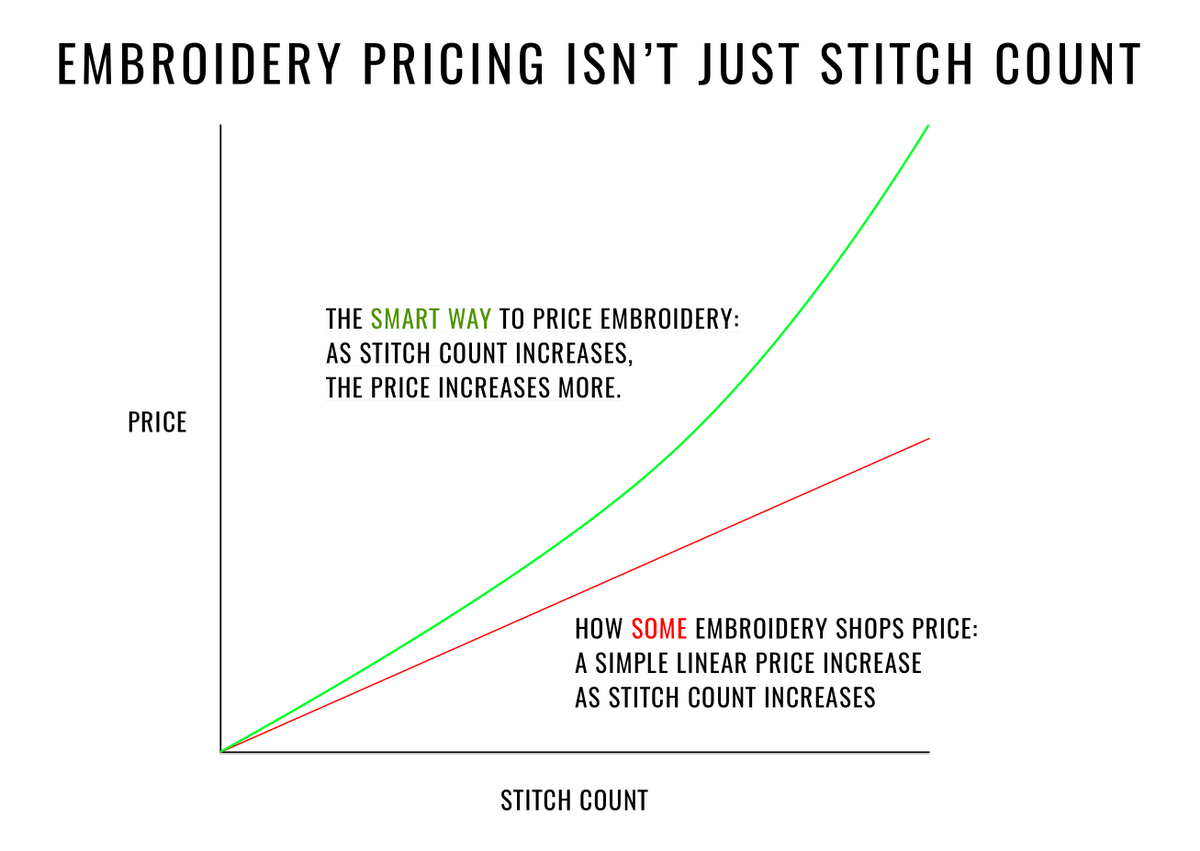
Then check the price against machine time. Machine minutes per piece are roughly stitch count divided by actual stitches per minute. At an effective 480 stitches per minute (an 800 stitch-per-minute rating at 60% efficiency for trims, color changes, and breaks), 8,000 stitches take about 17 minutes. On a 6-head machine, 24 polos are 4 cycles, or about 67 minutes of sewing before hooping and finishing. If that time is worth more than your stitch charge, the rate is too low. These efficiency figures are general practice; measure your own.
For a more in-depth walkthrough, refer to the embroidery pricing guide.
How should an embroidery shop schedule production?
Schedule embroidery by machine heads and hours, not by due date alone. A 24-piece order and a 240-piece order can share a due date and need very different amounts of machine time.
- Separate caps from flats. They use different frames and often run slower.
- Group jobs that share thread colors or similar placements to cut changeover time.
- Split large orders across days or machines so one job does not block every rush.
- Hold production until the sewout or artwork is approved and the garments are received.
A whiteboard can show this for one machine. With several multi-head machines, the schedule needs to show load per machine. See how to handle production scheduling for a full method.
A real shop workflow, start to finish
A four-person shop with two 6-head machines gets an order from a local HVAC company: 24 polos with a left chest logo and 24 caps with a front logo.
- Sales builds a single quote with two decoration lines, priced according to the shop’s stitch-count matrix, and attaches a mockup.
- The digitizer creates the file, sews a test piece, and attaches the sewout photo.
- The customer approves the quote and the artwork separately. A deposit request goes out with the approval.
- The order moves to “Garments ordered,” then “Ready to sew” when the blanks arrive.
- The production manager schedules caps on one machine and polos on the other, so both finish the same day.
- When the status changes to “Ready for pickup,” the customer receives an automatic message, and the payment request is sent.
How Printavo handles embroidery orders
Printavo is production-first shop management software for apparel decorators that connects quoting, approvals, scheduling, invoicing, and payments. While it doesn’t include digitizing features, it builds all the other key parts of an embroidery order:
- Quoting: pricing matrices calculate decoration pricing consistently, and customer-specific pricing can be stored by imprint process, so embroidery and screen printing can price differently for the same customer.
- Approvals: quote and artwork approvals can be handled separately and are recorded on the order before production starts. Reminders can go out automatically.
- Statuses and tasks: each shop configures its own steps, so an embroidery job can follow a different path than a screen print job.
- Automations: Based on your plan tier, you’ll get between 5 and 30 automation options for approval reminders, status updates, and payment reminders. See the full breakdown of automations per plan here.
- Power Scheduler (Premium): task lists by decoration method, machine assignment, capacity indicators, and job grouping.
- Production files and barcoding (Premium): the approved file travels with the job, and operators scan to pull it up.
- Printavo Payments: deposits, balances, and multi-payment requests. Invoices sync to QuickBooks Online for Standard and Premium plans.
Oregon Design Specialist runs embroidery and screen printing across two facilities in Portland. Co-owner Leydi Meza on customer approvals: “The first time we saw that a customer had approved something through Printavo, we’re just amazed.”
What should you ask when you compare embroidery shop management software?
- Can I walk one real order from quote to payment in the trial, including a cap and a flat?
- How do I set up stitch-count pricing and price breaks, and can I price embroidery differently by customer?
- Where does the approved file live, and can I see who approved it and when?
- Can quote approval and artwork approval happen separately?
- Does the schedule know my machines and heads, or only due dates?
- Which accounting software does it sync with, and how often?
- Is pricing per user or per plan?
- What data imports? (In Printavo, customers and pricing matrices import; line item detail on past orders does not.)
Video: managing an embroidery business
Justin Moore, owner of Barrel Maker Printing, decided to bring embroidery in-house. They made a $25,000 investment to have more control over turnaround time for a big client. Learn about the pros and cons of offering embroidery on-site and outsourcing.
FAQ
Do I need digitizing software if I outsource digitizing?
No. Many shops buy digitizing services. You still need a place to store the approved file, its stitch count, and the sewout, which is the job of shop management software.
Can QuickBooks run an embroidery shop?
QuickBooks handles accounting. It does not do stitch-count pricing matrices, approvals or production status. Printavo quotes and invoices, then syncs with QuickBooks Online on Standard and Premium plans.
What is the best embroidery software?
It depends on the problem. For sew quality, compare digitizing programs. For orders, approvals, scheduling, and payments, compare shop management systems with a real order.
Does embroidery shop management software work for multi-method shops?
Yes, if statuses and pricing can differ by method. Many shops run embroidery beside screen printing, DTG and DTF.
Related guides
- Printavo print shop software
- Print production management: build a repeatable workflow
- Print shop job tracking: build statuses your team can trust
- Screen printing quote template
- Printavo pricing
See how embroidery orders run in one system. Try Printavo free for 7 days. No credit card required.