
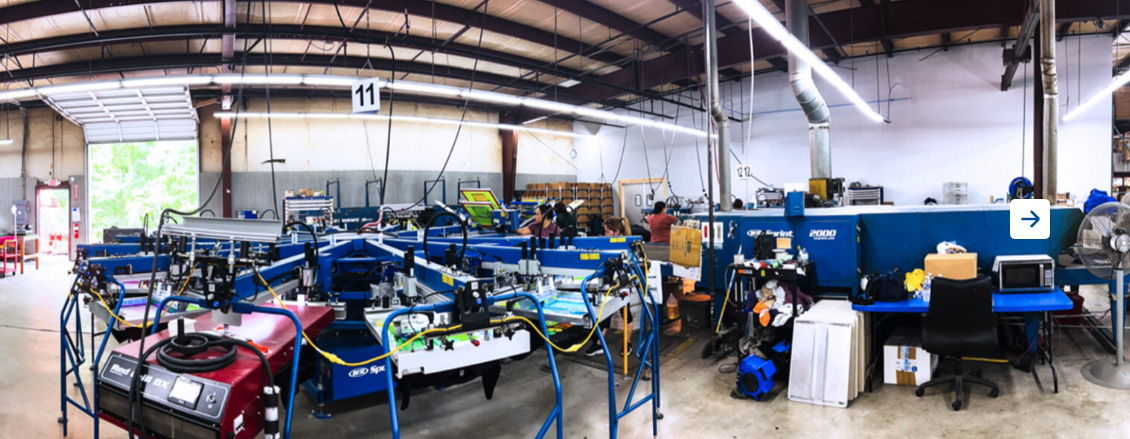
Running a growing print shop requires management skills as much as it does adding more presses, printers, heads, or square footage.
Eventually, jobs need to move through quoting, approvals, purchasing, art, scheduling, production, quality control, shipping, and customer communication without relying on one person to remember every detail.
That is where print production management software becomes a core part of a shop’s growth.
On the PrintHustlers Podcast, Rodney McDonald of US ColorWorks shared how they‘ve built a high-volume, multi-shift operation with hundreds of employees and tens of thousands of units moving through production each day.
One of Rodney’s biggest points is that scaling truly comes down to systems, people, process, and visibility.
First Things First
Rodney and US ColorWorks honed their focus as an operations-first business with a manufacturing background. The team leaned into what they were good at, built the infrastructure to support more volume, and created systems that helped the shop keep moving as the business grew.
For print shops trying to grow beyond owner-led production, that lesson matters.
What Is Print Production Management Software?
Print production management software helps print shops manage the production process from quoting through printing. It centralizes where teams track jobs, assign tasks, manage schedules, store production details, communicate internally, monitor status changes, and keep work moving across departments.
For screen printing, embroidery, DTF, DTG, signage, and other decorated apparel or print businesses, production management software helps answer questions like:
- What jobs are ready for production?
- What’s scheduled for today?
- Who owns the next step?
- What has changed since the job was approved?
- Where are delays building up?
- Who needs to be invoiced?
- What’s ready for pickup or shipping?
This system gives owners, managers, and production teams the visibility they need to keep orders moving through shop departments.
Growth Creates a Production Visibility Problem
The whiteboard is a good starting point, but as order volume grows and more employees get involved, information needs to be shared easily and organized well. Plus, more volume means more of your customers expect updates. Production needs a clear priority of when and where each order should happen, otherwise expensive misprints ramp up.
Rodney described one of US ColorWorks’ biggest growth moments as the point when the company hired its first director-level operations roles. Before that, the owners were still close enough to the floor to direct much of the work themselves.
That shift helped free the owners to focus on the next stage of growth.
Many print shops hit a similar point where the owner isn’t necessarily on the production floor every day, but everyone still depends on them for every order question. That dynamic creates a bottleneck.
The owner still handles all questions, and production meetings are mostly spent figuring out what changed.
Meanwhile, the rest of the employees rely on side conversations to understand what is ready. This leads to jobs hitting the production floor before they’re ready, and rush orders disrupting the entire schedule.
This situation leads to confusion and frustration for customers, too, since it makes it harder to share order updates in a timely and accurate manner.
Print production management software helps move order information into a shared system so production managers don’t have to chase every detail.
Production Management Is Different From General Shop Management
Print shop management software usually covers the broader business: customers, quotes, invoices, payments, approvals, scheduling, and communication.
Print production management software focuses more specifically on what happens once a job needs to move through the shop.
The two systems work together to build a connected workflow like this:
Quote —-> Customer Approval —> Job Scheduling —> Assign Tasks —> Production —> Shipping/Pickup
When those steps are disconnected, shops build workarounds. When they’re connected, the production team operates with more consistency.
Touchpoints are The Real Cost
Rodney’s strongest points came when he discussed print-on-demand.
US ColorWorks had avoided DTG and print-on-demand work for a long time because the team did not believe the technology and order flow were ready. The printing itself was not the biggest issue. The logistics of moving every order through the shop seemed more challenging.
That’s because every touchpoint for a small or one-off order dips into your margin.
Building the order, proof, and paperwork all take time. And those touchpoints don’t even account for other variables like moving order information from one system to another, or potential misprints.
Rodney explained that for print-on-demand to work, the system had to manage the order from purchasing to shipping and every step in between.
Even in bulk screen printing or embroidery, every unnecessary touch creates drag. A production manager may not feel the cost on one job, but across hundreds of orders, those small handoffs become a capacity issue.
A strong print production management system saves time by centralizing details like:
- Order details
- Approved artwork
- Due dates
- Production notes
- Task ownership
- Customer approvals
- Scheduling
- Status updates
- Payment and invoice context
- Shipping or pickup details
This information helps employees make faster, more confident decisions and frees up the owner or manager.
High-Volume Shops Need Better Production Data
At US ColorWorks, moving into print-on-demand required order data to be sorted and presented in a way that production could execute efficiently. That meant designs had to be organized correctly and orders grouped accordingly.
That is a key lesson in production management.
For growing shops, production data should help answer:
- Is this job approved?
- Are all garments or blanks received?
- Is the artwork production-ready?
- What decoration method is required?
- What is the promised due date?
- Who is responsible for the next step?
With that information confirmed, production leaders can spend less time deciphering a job and more time moving orders through the shop.
Scheduling for Capacity Not Due Dates
Growing businesses need to know where the order fits across their entire schedule and staff capacity, because every job is slightly different.
For example, screen printing jobs require steps such as separations, screens, and press time, while embroidery calls for digitizing, sewing time, and trimming.
A DTF or DTG order may involve art prep, printing, curing, garment handling, packing, and fulfillment.
If the schedule shows only the final due date, the team has no way to budget time for all the other steps.
Print production management software helps teams see what is ready, in queue, and any blockers.
This is where scheduling, task management, and job statuses become more valuable together than they are separately. A production calendar can show what is planned. Tasks and statuses indicate whether the job is ready to run.
Standardized Department Handoffs
Rodney shared several values that guide the team at US ColorWorks: following through, having urgency, owning the work, and paying attention to details.
That accountability matters in production because every job moves through multiple people and departments. If the handoff is unclear, the next person has to stop and figure out what is missing.
Software doesn’t guarantee accountability, but it can simplify the practice and provide clarity.
That clarity helps with:
- Department handoffs
- Manager visibility
- Daily production meetings
- Rush order decisions
- Training new employees
- Reducing repeat mistakes
- Communicating with customers
- Reviewing what happened after a delay
That structure helps build a culture of ownership across all departments, too.
The Right System Helps Shops Adapt
One of the most useful parts of Rodney’s story is how often US ColorWorks had to adapt.
After moving into print-on-demand, the business changed quickly. Customers increasingly wanted both bulk printing and print-on-demand capabilities from one partner.
That is a good reminder for any print shop evaluating production software: the platform you choose should address current and future challenges.
That may include:
- Expanding into a new decoration method like DTF or DTG
- Taking on more online store orders
- Adding a second shift
- Hiring production managers
- Standardizing recurring customer programs
As order volume grows, the shop needs a system that helps the team adjust without rebuilding the process from scratch every time.
When Should a Shop Move to Print Production Management Software?
A shop should consider print production management software when production work is moving faster than the team’s current system can support.
- Common signs include:
- Jobs are getting delayed
- Order information gets lost
- The Owner or production manager owns all order information
- Orders are built with spreadsheets, whiteboards, and text messages.
- Customer communication is reactive.
- The shop is adding new printing methods or services
- The team is growing and needs clearer ownership
How Printavo Helps With Print Production Management
Printavo helps print shops organize production by connecting the daily work that keeps orders moving: quotes, approvals, invoices, payments, scheduling, customer communication, tasks, and job tracking.
For production teams, that means a completed connected process and a clearer view of what needs attention.
With Printavo, shops can:
- Track jobs from order intake through production
- Organize job details in one place
- Manage quotes, invoices, and customer orders
- Build production schedules
- Assign tasks and due dates
- Communicate with customers and team members
- Use automations for approvals, payment requests, and status changes
- Keep production workflows connected to the rest of the business
For growing shops, the value is simple: your team gets a clearer system for moving work forward.
Instead of relying on memory, side conversations, or disconnected tools, Printavo gives shops a central place to manage the information behind every job.
That helps owners and production managers see what is happening, what is stuck, and what needs to happen next.
Build the System Before the Next Growth Stage
Rodney’s biggest lesson is that production growth requires a production structure.
More equipment can increase capacity, but only if the shop has the systems to feed that equipment with accurate information.
Print production management software gives growing shops a better way to manage that complexity.
Ready to see how Printavo can help your shop manage production, scheduling, approvals, and job tracking in one place?
Book a Printavo demo today.
FAQ
What is print production management software?
Print production management software helps print shops manage jobs as they move through production. It centralizes job details, schedules, tasks, approvals, production notes, customer communication, and status updates so teams can keep work moving from order intake to completion.
Who uses print production management software?
Print production management software is used by screen printing shops, embroidery businesses, DTF and DTG printers, sign shops, apparel decorators, and other custom print businesses that need more efficient production processes.
What features should print production management software include?
Print production management software should include job tracking, production scheduling, task management, status updates, approval workflows, customer communication, quote and invoice management, file storage, and reporting tools.
How does print production management software help growing shops?
It helps growing shops reduce manual handoffs, keep job details organized, improve production visibility, assign clear ownership, manage schedules, and make it easier for teams to know what is ready, what is waiting, and what needs attention.
Is print production management software different from print shop management software?
Print production management software focuses specifically on managing the movement of jobs through production. Print shop management software is broader and may also include quoting, invoicing, approvals, payments, customer communication, scheduling, and reporting. For most shops, the best system connects both.
When should a shop invest in print production management software?
A shop should consider print production management software when jobs are getting delayed, production details are hard to find, scheduling is unclear, or the owner has become the main source of truth for every job. It is especially useful for shops adding staff, equipment, departments, or decorative methods, or for higher-order volume.
Ready to rethink your production workflow? Try Printavo for free.

0 Comments